
Squarespace pricing, explained: the plan you need depends on what you sell
Squarespace is $19 a month for Basic, $29 for Core, $49 for Plus and $99 for Advanced on annual billing, or $25, $39, $65 and $139 if you pay monthly. Read on September 6, 2026 from Squarespace's own page. The finding that drove this study is that the plans are sorted by how big your business is but priced by what you sell: Basic to Core pays off at $500 a month in sales, while Core to Plus pays off at $10,000 a month if you sell physical goods and $500 a month if you sell digital content. Same two plans, a twentyfold difference.
Pricing teardown
The plans are described by business size and decided by product type. Basic is sold as a commerce plan and priced as a penalty: it charges 2 percent on products and 7 percent on digital content on top of card fees.
What a buyer pays, as of Sep 6, 2026
| Buyer | Best plan | What they actually pay each month |
|---|---|---|
| Personal site, nothing sold | Basic | $19 (or $25 monthly) |
| Shop, $3,000/mo in goods | Core, not Basic | $134 against $184 on Basic |
| Selling a $200 course, 10 sales/mo | Plus, the third plan up | $126 against $220 on Basic |
What the study found
- Basic is sold as a commerce plan and priced as a penalty. Its feature list includes Sell products and services, Send invoices for free and Sell content and memberships, while charging 2 percent on products and 7 percent on digital content on top of card fees. A $200 course nets about $180 before the subscription. Any seller past roughly $500 a month is losing money by staying on it.
- The plans are described by business size and decided by product type. A tiny seller of digital content should be on Plus, the third tier, while a physical-goods shop doing ten times the revenue should be on Core. Nothing in the descriptions would lead either buyer there.
- The upgrade break-evens are computable and absent. Basic to Core pays off at $500 a month in product sales. Core to Plus pays off at $10,000 a month for physical goods but $500 a month for digital content and memberships. Plus to Advanced pays off at $25,000 and $5,000 respectively.
- The page claims an annual saving it does not offer. Pay annually to save up to 36 percent, says the subhead. Measured across all four plans the real savings are 24, 26, 25 and 29 percent. Nothing on the page reaches 36.
- Three of four plans carry a 50 percent off badge with no terms. Core, Plus and Advanced show it, Basic does not, and a code is offered at checkout. The page never says what the discount covers, how long it lasts, or what the renewal price is.
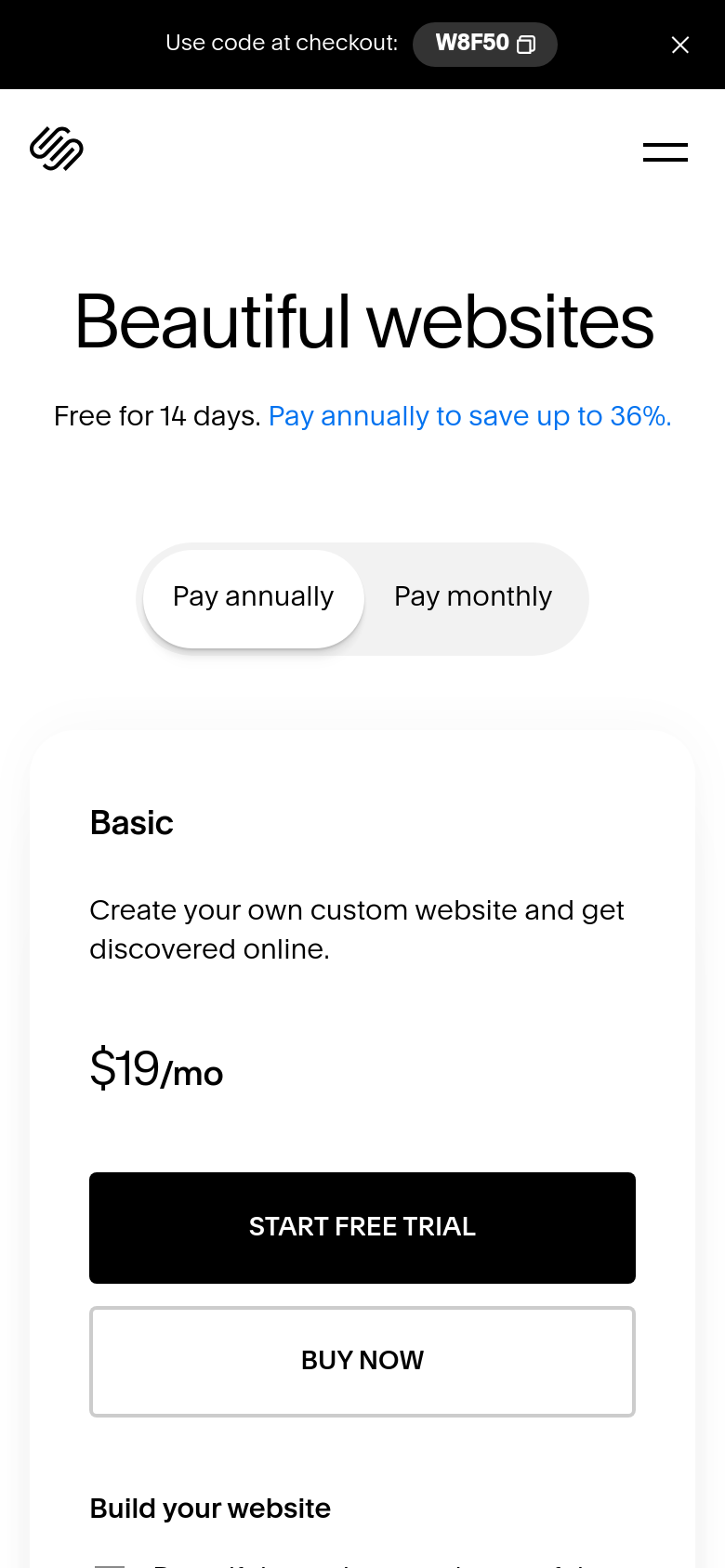
- On a phone the promotion is truncated to a code with no discount. The bar reads Use code at checkout W8F50 with the 50 percent off half cut away, and the only plan visible at the phone fold is Basic, which the promotion excludes.
Read the full study
Squarespace pricing teardown
Published 2026-09-07 via Cobalt Capture.
Reviewing: https://www.squarespace.com/pricing
Summary
The finding in one line: Squarespace sorts its plans by how big your business is, but prices them by what you sell, and the two produce different answers. Every step up the ladder buys a fee reduction, so each has a sales figure above which it pays for itself. Basic to Core pays off at $500 a month. Core to Plus pays off at $10,000 a month if you sell physical goods, but $500 a month if you sell digital content. Same two plans, a twentyfold difference, and none of these numbers appears on the page.
Run cold against the public pricing page on 6 September 2026, US. No account, nothing submitted. Both billing states surfaced from the page itself.
The price story the page transmits
In the buyer's words: "Nineteen dollars a month for a website, and more if I want business features."
What is true: $19 a month only if you pay for a year, $25 if not, plus 2% of everything you sell and 7% of anything digital unless you move up a plan, plus card processing, plus a domain renewal in year two.
The buyer math
| Buyer | Best plan | What they actually pay each month |
|---|---|---|
| Personal site, nothing sold | Basic | $19 (or $25 monthly) |
| Shop, $3,000/mo in goods | Core, not Basic | $134 against $184 on Basic |
| Selling a $200 course, 10 sales/mo | Plus, the third plan up | $126 against $220 on Basic |
Findings, worst first
MISLEADS
1. Basic is sold as a commerce plan and priced as a penalty. Its feature list includes "Sell products and services", "Send invoices for free" and "Sell content and memberships", while it charges 2% on products and 7% on digital content on top of card fees. Seven percent means a $200 course nets about $180 before the subscription. Any seller past roughly $500 a month is losing money by staying on Basic, and nothing on the card says so. Direction: label Basic's commerce features with their fee, on the card.
2. The plans are described by business size and decided by product type. "As you grow your business" and "as your business grows" tell a buyer to move up when they get bigger. In fact a tiny seller of digital content should be on Plus, the third tier, while a physical-goods shop doing ten times the revenue should be on Core. The page offers no way to reach that. Direction: split the ladder by what you sell, or print the break-even on each card.
3. The page claims an annual saving it does not offer. "Pay annually to save up to 36%." Measured across all four plans the actual savings are 24%, 26%, 25% and 29%. Nothing on this page reaches 36%. Direction: quote the real number, which is still a good one.
4. Three of four plans carry a "50% off" badge with no terms. Core, Plus and Advanced show it, Basic does not, and a code is offered at checkout. The page never says what the discount covers, how long it lasts, or what the renewal price is, so none of the four displayed numbers is the price of an identifiable thing. Direction: state the discounted price, the term, and the renewal price together.
STALLS
5. The default billing state is the cheaper one and the difference is not shown. Monthly billing is $25, $39, $65 and $139, between 24% and 29% above the displayed prices. A buyer unwilling to commit to a year is reading numbers that do not apply to them.
6. The free domain is for one year, on annual plans only. It is presented as a plain feature on all four cards, with the condition behind an asterisk. Year two is a renewal cost the buyer has not been shown.
7. Card rates are "starting at", so the buyer math above is a best case and the page does not commit to any of it.
FRICTION
8. On a phone the promotion is truncated to a code with no discount. The bar reads "Use code at checkout: W8F50" with the "Get 50% off select plans" half cut off, so a phone visitor is handed a code and not told what it is worth. The only plan visible at the phone fold is Basic, which is the one plan the promotion excludes.
Keep list, the do-not-regress half
- Every plan prints its card rate, its store transaction fee and its digital fee, on the card. This is genuinely good practice, most of the category hides at least one of the three, and it is the only reason the break-even arithmetic in this study was possible at all.
- Basic's contributor limit is a number, "Up to 2 contributors", not an adjective. The rest are unlimited and say so.
- The 14-day free trial is on the fold and no card is demanded on the card face.
- Both billing states are one obvious click apart, with the toggle in plain sight rather than buried.
- A full feature list is offered rather than left implied.
- Every plan explicitly builds on the one before it, so the buyer is not hunting for what they lose by going down a tier.
Scope and method
Public page only, on 6 September 2026. The desktop and phone folds were rendered and captured in the default annual state. The monthly prices were surfaced by switching the page's own toggle and reading the resulting values, and are reported as text rather than a capture. Buyer math uses Squarespace's own printed rates, an average order near $50 for the physical case, and a $200 unit price for the digital case; different order values move the 30-cent component but not the break-even points, which depend only on the percentage gaps.
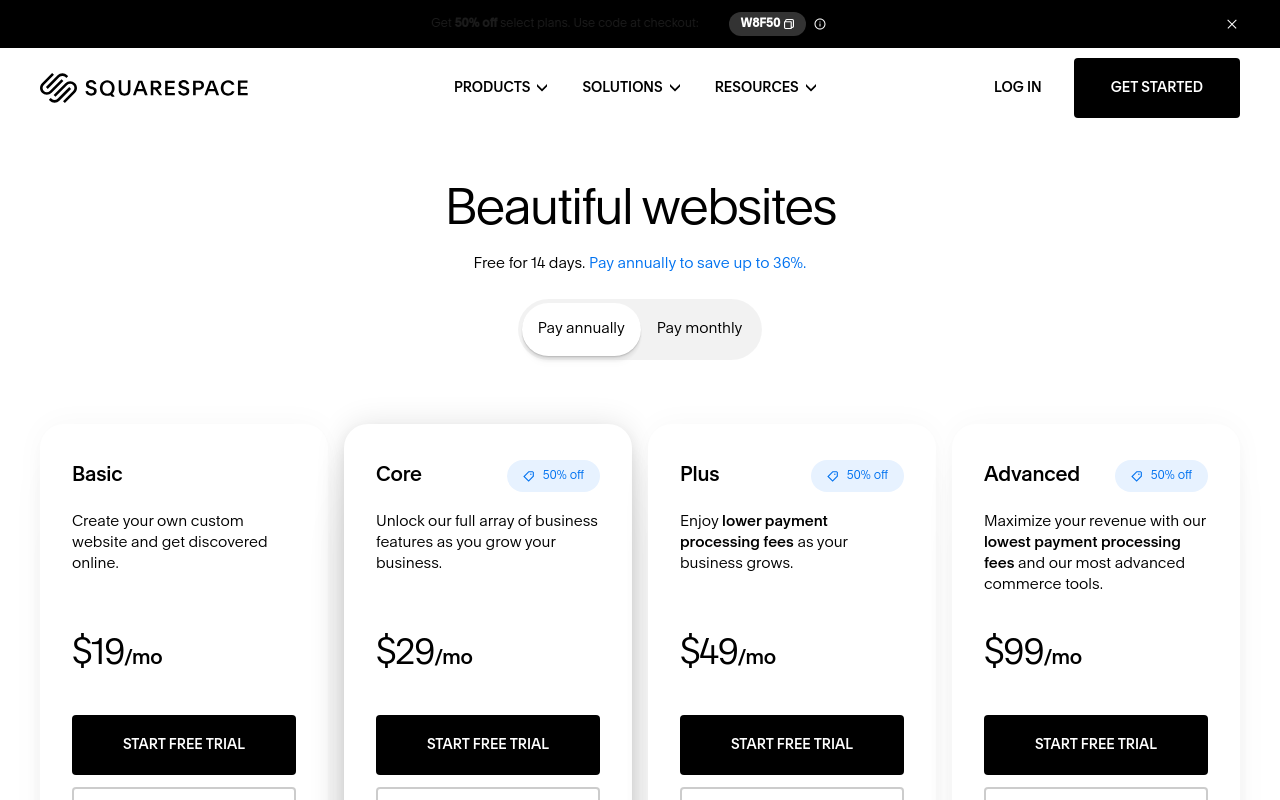
Squarespace pricing, desktop fold, default state
Source: https://www.squarespace.com/pricing
The phone fold: the promo bar, then one plan
Source: https://www.squarespace.com/pricing
Pass A: the five-second fold
Desktop, default state. From the fold alone:
- How many plans and what are they called? Four: Basic, Core, Plus, Advanced. Clear.
- Which is mine? Not answerable, and this is the study's main finding. The descriptions sort the plans by business size ("as you grow your business", "as your business grows"), but the actual differences are transaction fees that depend on what you sell, not how big you are.
- What does it cost? $19, $29, $49, $99 a month. Those are annual-billing prices; the toggle defaults to "Pay annually".
Read in the other state by clicking the toggle: Basic $25, Core $39, Plus $65, Advanced $139. Between 24% and 29% higher.
The page claims a saving it does not offer. The subhead reads "Pay annually to save up to 36%." Measured across all four displayed plans, annual billing saves 24% on Basic, 26% on Core, 25% on Plus and 29% on Advanced. Nothing on this page reaches 36%.
Three of four plans wear a "50% off" badge. Core, Plus and Advanced carry it; Basic does not. A banner offers code W8F50 at checkout. The page does not say what the discount applies to, for how long, or what the price becomes at renewal, so the four numbers on the cards are not the price of anything a new customer can identify.
Phone: the promo bar is truncated to "Use code at checkout: W8F50" with the discount amount cut off entirely, so a phone visitor is handed a code and not told what it is worth. Below it, the only plan at the fold is Basic, which is the one plan the promotion does not apply to.
Pass B: the buyer math, and the fee axis the page never names
The fee structure, all four plans, from the cards themselves:
| Plan | Annual | Monthly | Card rate | Store fee | Digital and memberships fee |
|---|---|---|---|---|---|
| Basic | $19 | $25 | 2.9% + 30c | 2% | 7% |
| Core | $29 | $39 | 2.9% + 30c | 0% | 5% |
| Plus | $49 | $65 | 2.7% + 30c | 0% | 1% |
| Advanced | $99 | $139 | 2.5% + 30c | 0% | 0% |
Buyer 1, a personal site, nothing sold. Basic at $19 a month, $228 a year, or $300 if paid monthly. Nothing else applies. This buyer is well served.
Buyer 2, a small shop selling physical goods, $3,000 a month over 60 orders. On Basic: $19 subscription, plus 2% store fee which is $60, plus card fees of about $105. $184 a month. On Core: $29, no store fee, same card fees. $134 a month. Core is $50 a month cheaper than Basic for this seller.
Buyer 3, selling a $200 online course, ten sales a month. On Basic: $19 + 7% which is $140 + about $61 in card fees. $220 a month to collect $2,000. On Core: $190. On Plus: $49 + 1% which is $20 + $57. $126. On Advanced: $152. The right answer is Plus, the third plan up, and nothing on the page would lead this buyer there.
Pass C: the crossovers, computable and absent
Each step up buys a reduction in fees, so each has a sales figure above which it pays for itself. All of these come from Squarespace's own printed numbers:
- Basic to Core: $500 a month in product sales. The extra $10 removes a 2% store fee, and $10 divided by 0.02 is $500. That is an extremely low bar.
- Core to Plus: $10,000 a month if you sell physical goods (the gain is 0.2% off the card rate), but only $500 a month if you sell digital content or memberships (the gain is 4%). Same two plans, a twentyfold difference in the answer, decided entirely by what you sell.
- Plus to Advanced: $25,000 a month for physical goods, $5,000 a month for digital.
The page sorts its plans along one axis, business size, when the economics run along a different one, product type. A visitor cannot pick correctly from the descriptions, and the arithmetic that would let them is one division away and never shown.
The sharpest version of this: Basic is not a commerce plan, but it is sold as one. Its feature list includes "Sell products and services", "Send invoices for free" and "Sell content and memberships", while charging 2% on products and 7% on digital content. Seven percent on top of card fees means a $200 course nets about $180 before Squarespace's own subscription. Any seller past $500 a month is losing money by staying on it, and nothing on the card signals that.
Pass D and E: fine print and trust
- "Free custom domain*" appears on all four plans. The asterisk resolves to annual plans only, and for one year: "If you purchase an annual plan, you'll receive a free custom domain for one year." Year two is a renewal the buyer has not been shown.
- "Professional email from Google Workspace"** carries a second asterisk and is a third-party product with its own eventual cost.
- Basic allows "Up to 2 contributors", a real number rather than an adjective, and the others are unlimited. Good.
- Card rates are quoted "starting at", so the rate is not committed to.
- The trial is 14 days and stated on the fold, with no card demanded on the card face.
Made with Cobalt Capture.
Open the live review for the export buttons (markdown, PDF, Word) and the share card.
Run this on your product
Connect the Cobalt server once, then ask for a pricing teardown of your own site. Replace the placeholder URL with yours.
-
Claude Code
/mcp__cobalt__pricing_teardown https://your-product.com -
Codex
Run: curl -s https://cobaltcapture.com/playbooks/pricing-teardown.md Then follow it exactly against https://your-product.com -
Cursor, VS Code, Claude chat, Perplexity
Run a pricing teardown of https://your-product.com
Claude Code runs it as a slash command once the server is connected. Codex has no slash commands: connect with codex mcp add cobalt --url https://cobaltcapture.com/mcp, then paste the two lines. Cursor and VS Code connect with the button above, then take the sentence. In Claude chat or Perplexity, add https://cobaltcapture.com/mcp as a connector and ask in plain words; this study reads public pages, so it runs in full there. What this study checks.
Connect your agent to Cobalt
Cursor and VS Code install in one click. Claude Code and Codex copy a command to run in your terminal, then restart the app.
Squarespace prints more of its real economics on the cards than almost anyone in this category: the card rate, the store transaction fee and the digital content fee all appear on every plan. That is the only reason the arithmetic below is possible, and it deserves saying before the criticism.
The criticism is that the page then sorts those plans along the wrong axis. The descriptions talk about growing your business. The economics turn entirely on whether what you sell is physical or digital, and the two produce answers that differ by a factor of twenty.
If you only want the answer: not selling, Basic. Selling products, Core past about $500 a month. Selling courses or memberships, Plus.
Prices are what squarespace.com showed on the run date at the top of the section above. When Squarespace changes them, the study is re-run and this page moves to the new review.
Frequently asked questions
How much does Squarespace cost?
As of September 6, 2026 in the United States: Basic is $19 a month, Core is $29, Plus is $49 and Advanced is $99, all on annual billing. Paying monthly instead costs $25, $39, $65 and $139, between 24 and 29 percent more. Every plan also charges card processing starting at 2.9 percent plus 30 cents, falling to 2.5 percent on Advanced, and Basic adds a 2 percent fee on product sales and 7 percent on digital content and memberships.
Which Squarespace plan do I need?
It depends on what you sell, not how big you are. If you are not selling anything, Basic at $19 a month is the right plan and nothing else applies. If you sell physical products, move to Core as soon as you pass about $500 a month, because Basic charges a 2 percent transaction fee that Core removes and Core costs only $10 a month more. If you sell digital content, courses or memberships, go to Plus: Basic charges 7 percent and Core 5 percent on those sales, while Plus charges 1 percent, which pays back the extra $20 a month at around $500 in monthly sales.
Is Squarespace Basic good for an online store?
Not really, despite being sold as one. Basic lists Sell products and services and Sell content and memberships among its features, but charges a 2 percent transaction fee on products and 7 percent on digital content, on top of card processing at 2.9 percent plus 30 cents. Selling a $200 online course on Basic costs about $20 in combined fees. Core removes the product transaction fee entirely for $10 a month more, so almost any real seller is better off there.
Is it cheaper to pay Squarespace annually?
Yes, by 24 to 29 percent depending on the plan. Basic is $19 a month annually against $25 monthly, Core $29 against $39, Plus $49 against $65 and Advanced $99 against $139. The page's claim of up to 36 percent was not reachable on any of the four plans when this study ran. Annual billing also includes a free custom domain, though only for the first year, after which it renews at cost.
What are Squarespace's transaction fees?
Basic charges 2 percent on online store sales and 7 percent on digital content and memberships. Core drops the store fee to zero and the digital fee to 5 percent. Plus is zero and 1 percent. Advanced is zero and zero. Separately, card processing runs from 2.9 percent plus 30 cents on Basic and Core, 2.7 percent on Plus and 2.5 percent on Advanced. These are the numbers that actually decide which plan is cheapest for you, and Squarespace prints all of them on the cards, which is more than most of the category does.
How was this run?
With CobaltCapture's pricing teardown playbook, run by an AI agent against squarespace.com's public pricing page on September 6, 2026, with no account created and nothing submitted. The desktop and phone folds were captured in the default annual state, and the monthly prices were surfaced by switching the page's own toggle. Buyer math uses Squarespace's own printed rates, an average order near $50 for the physical case and a $200 unit price for the digital case; different order values move the 30-cent component but not the break-even points, which depend only on the percentage gaps.
Run your first study.
Give your AI assistant a URL and walk away. Come back to a shareable review with real screenshots and the verdict on top.
Run a study