
Canva pricing, explained: the four words that change what Business costs
Canva Free is free, Pro is $180 a year for one person, Business is $250 a year per person, and Enterprise is on request. Read on September 6, 2026 from Canva's own page. The finding that drove this study is that Business, the tier wearing the Recommended badge, is the only one priced per person, and the four words that say so are the smallest text on the card. A buyer reads $180 then $250 and takes away seventy dollars more. For the five-person team Business is sold to, the real step is $1,070 a year.
Pricing teardown
The tier Canva recommends is the one that changes the pricing model. Pro is priced for one person, Business is priced per person, and the difference between a $70 step and a $1,070 step is four words of grey text.
What a buyer pays, as of Sep 6, 2026
| Buyer | Plan | Yearly | Monthly billing |
|---|---|---|---|
| One person | Pro | $180/year | $216/year |
| A team of five | Business (Pro is unavailable to teams) | $1,250/year | $1,500/year |
| A company of 25 | Business | $6,250/year | $7,500/year |
| A company of 25 on Enterprise | Enterprise | Cannot determine | Cannot determine |
What the study found
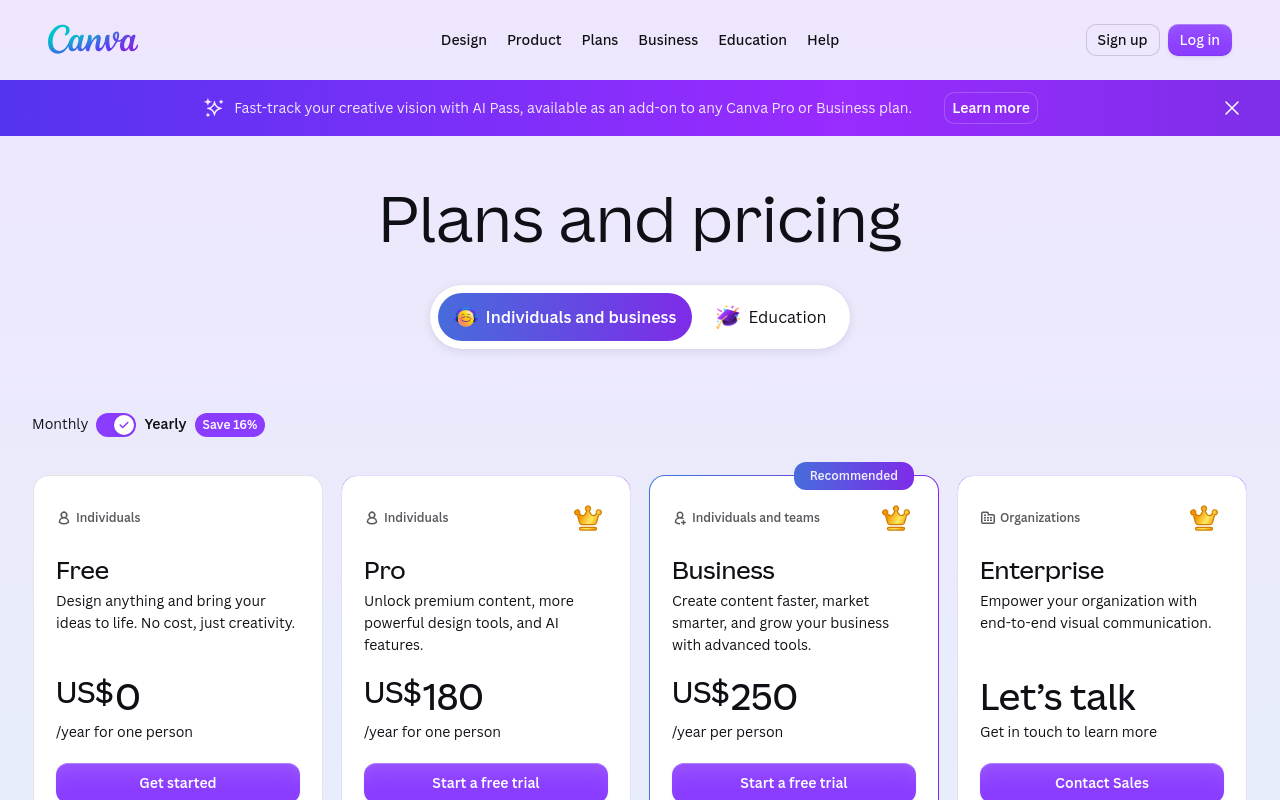
- The Recommended tier is the only one priced per person. Pro reads slash year for one person, Business reads slash year per person, in grey, at about a third the size of the price. Between two adjacent cards that is a fifteen-fold difference in what the upgrade costs a five-person team, presented as a $70 step.
- Pro cannot be used by a team at all, and that fact lives only in the FAQ. A buyer whose team is about to grow is not choosing between two prices; they are about to be moved onto per-seat billing with no flat option available.
- Prices are shown as annual totals while the category quotes monthly. US$180 per year against a competitor's $20 per month is not a comparison most shoppers will normalise, and the unit is the smallest line on the card. In the monthly state Pro is $18 and Business is $25 per person.
- The AI allowance is the binding limit and it is not a usable unit. Free is up to 200 Standard AI uses or 20 Premium AI uses, and the footnote says higher tiers consume more of the allowance and that uses may vary by tool. A buyer cannot work out whether a normal month fits inside their plan.
- The remedy for that limit is an add-on with no price on the pricing page. AI Pass appears in a banner promising 40 times more AI than Canva Pro and is not costed anywhere on the page.
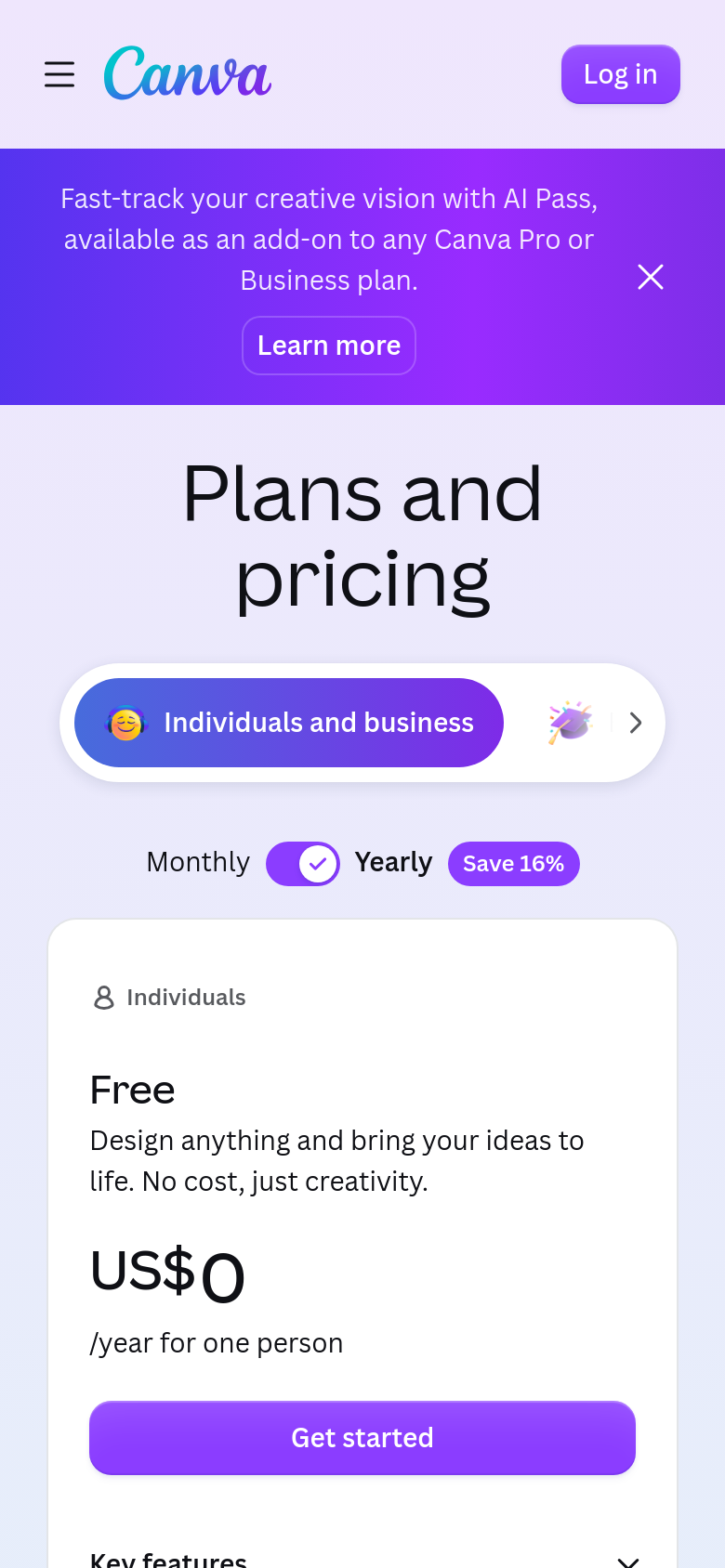
- On a phone the AI Pass banner consumes roughly a fifth of the fold before the page heading, and only the Free card is visible on the first screen, so the phone visitor meets the plans in a different order to the desktop one.
Read the full study
Canva pricing teardown
Published 2026-09-07 via Cobalt Capture.
Reviewing: https://www.canva.com/pricing/
Summary
The finding in one line: the tier Canva recommends is the one that changes the pricing model, and the four words that say so are the smallest text on the card. Pro is priced "/year for one person". Business, wearing the Recommended badge, is priced "/year per person". A buyer reads $180 then $250 and takes away "seventy dollars more". For the team of five that Business is sold to, the real step is $1,070 a year. For a company of 25 it is $6,070.
Run cold against the public pricing page on 6 September 2026, US. No account, nothing submitted. Both billing states surfaced from the page itself.
The price story the page transmits
In the buyer's words: "Free is generous, Pro is a hundred and eighty a year, and Business is a bit more than that."
What is true: Pro is $180 a year for exactly one person and cannot be used by a team at all. The moment a second person is involved you are on Business at $250 per person per year, plus tax, plus an unpriced AI add-on if you use the AI tools much.
The buyer math
| Buyer | Plan | Yearly | Monthly billing |
|---|---|---|---|
| One person | Pro | $180/year | $216/year |
| A team of five | Business (Pro is unavailable to teams) | $1,250/year | $1,500/year |
| A company of 25 | Business | $6,250/year | $7,500/year |
| A company of 25 on Enterprise | Enterprise | Cannot determine | Cannot determine |
Findings, worst first
MISLEADS
1. The Recommended tier is the only one priced per person, and the page never says so above the fold. Pro reads "/year for one person", Business reads "/year per person", in grey, at about a third the size of the price. Between two adjacent cards that is a fifteen-fold difference in what the upgrade costs a five-person team, presented as a $70 step. Direction: put the per-person unit in the price itself, or show a worked total for a small team on the Business card.
2. Pro cannot be used by a team, and that fact lives only in the FAQ. A buyer whose team is about to grow is not choosing between two prices; they are about to be moved onto per-seat billing with no flat option available. That belongs on the Pro card as a limit. Direction: state "one person only" on the Pro card, where the buyer decides.
3. Prices are annual totals while the category quotes monthly. "US$180 /year" against competitors' "$20/month" is not a comparison most shoppers will normalise. The unit is disclosed, in the smallest line on the card, under the largest number. Direction: show both, as the monthly state already can.
STALLS
4. The AI allowance is the binding limit and it is not a usable unit. Free is "Up to 200 Standard AI uses or 20 Premium AI uses", and the footnote says higher tiers consume more of the allowance and that uses "may vary by tool". A buyer cannot work out whether a normal month fits inside their plan, which is the entire job of a usage limit.
5. The remedy for that limit is an add-on with no price on the pricing page. AI Pass appears in a banner promising "40x more AI than Canva Pro" and is not costed anywhere here. The cards set a limit in an undefined unit and point at an uncosted purchase.
6. Enterprise has neither a starting price nor a seat threshold. A 25-person company cannot tell whether it belongs on Business or must contact sales.
FRICTION
7. On a phone the AI Pass banner consumes roughly a fifth of the fold before the page heading, and only the Free card is visible on the first screen. The Recommended tier is several screens down, so the phone visitor meets the plans in a different order to the desktop one.
Keep list, the do-not-regress half
- Every card carries an audience label above the plan name. Individuals, Individuals, Individuals and teams, Organizations. A visitor can locate their row before reading a single price.
- The free tier is real and specified, not a teaser. 1.6M templates, 4.7M assets, 5GB storage, a brand kit, all listed rather than gestured at.
- The FAQ is substantial and answers the awkward questions, including how billing works when you add a team member mid-cycle and what happens to nonprofits and students. That is the question a per-seat plan most needs to answer and it is answered.
- "Prices exclude applicable tax" is stated rather than discovered at checkout.
- Free trials on both paid tiers, with no card demanded on the card face.
- Each plan explicitly includes everything in the previous one, stated in the footnotes, which removes a common source of confusion in feature tables.
Scope and method
Public page only, on 6 September 2026. The desktop fold and the phone fold were rendered and captured in the default Yearly state. The Monthly state was surfaced by switching the page's own toggle and reading the resulting prices from the page, and is reported as text rather than a capture. Buyer math uses the page's own figures with no assumptions beyond seat count.
Note on access: this page refuses plain text fetches with a 403, so the figures here come from a rendered browser session rather than a document fetch. That is worth recording because it means most automated readers, including the answer engines people now ask about pricing, cannot read this page at all.
Canva pricing, desktop fold, default state
Source: https://www.canva.com/pricing/
The phone fold: the Free card fills the screen
Source: https://www.canva.com/pricing/
Pass A: the five-second fold
Desktop, default state. From the fold alone:
- How many plans and what are they called? Four: Free, Pro, Business, Enterprise. Clear, and each carries an audience label above the name: Individuals, Individuals, Individuals and teams, Organizations.
- Which is mine? Mostly answerable, with one trap covered below.
- What does it cost? US$0, US$180, US$250, and "Let's talk".
Except those are annual totals, not monthly prices. The unit line reads "/year for one person". Almost every product this page competes with quotes a monthly number, so a shopper comparing Canva at $180 against a rival at $20 is comparing a year to a month unless they read the small grey line under the figure. The toggle defaults to Yearly with a "Save 16%" badge attached.
Read in the other state, by clicking the toggle: Pro is US$18/month for one person, Business is US$25/month per person. Both states were surfaced from the page itself, the yearly one captured in the screenshots above and the monthly one read from the page after switching the toggle.
Phone: the Free card fills the entire first screen. The AI Pass banner takes roughly a fifth of the fold before the heading even appears, and the Recommended tier is several screens down.
Pass B: the buyer math
| Buyer | Plan the page steers them to | Yearly billing | Monthly billing |
|---|---|---|---|
| One person | Pro | $180/year | $18/mo, $216/year |
| A team of five | Business (Pro is not available for teams) | 5 x $250 = $1,250/year | 5 x $25 x 12 = $1,500/year |
| A company of 25 | Business, or Enterprise | 25 x $250 = $6,250/year | $7,500/year |
| A company of 25 on Enterprise | Enterprise | Cannot determine | Cannot determine |
Pass C: the trap in the Recommended tier
This is the finding.
Pro is priced "/year for one person". Business is priced "/year per person". The distinction is four words long, set in grey, at roughly a third of the size of the number above it. And Business is the tier wearing the Recommended badge.
A buyer reading the cards left to right sees $180, then $250, and takes away "Business is seventy dollars more". For the team of five that Business is explicitly sold to, "Individuals and teams", the real step from Pro to Business is $1,070 a year, and for a company of 25 it is $6,070. The number on the card is right. The impression it creates is wrong by a factor of fifteen.
The playbook's rule for this is that a highlighted tier which flips the pricing model is a trap rather than a nudge, and this is the cleanest example of it I have seen. It is made worse by a detail that lives only in the FAQ: Pro cannot be used by a team at all. So the moment a second person is involved, the buyer is not choosing between $180 and $250, they are being moved onto a per-seat plan with no single-price option available, and the page never says so above the fold.
Pass D: the limits, and the add-on the cards do not price
The real constraint on every Canva plan now is the AI allowance, and it is not a number a buyer can act on.
- Free is "Up to 200 Standard AI uses or 20 Premium AI uses".
- The footnote says: "Use estimates represent total AI uses across AI tiers. Paid plans include a shared AI allowance across Standard, Premium and Ultra AI... Higher-tier AI use more of your allowance and uses may vary by tool."
So a "use" is not a fixed unit, the tiers consume the allowance at different and unstated rates, and consumption "may vary by tool". A buyer cannot estimate whether their month of work fits inside their plan, which is the one thing a usage limit exists to tell them.
And the thing those limits push you toward is not priced on this page. A dismissible banner across the top, repeated further down, offers AI Pass: "Unlock 40x more AI than Canva Pro - or 20x more than Canva Business - to use across Ultra, Premium and Standard AI tools; available as an add-on to both plans." No price appears anywhere on the pricing page. The cards set a limit in an undefined unit, and the remedy for hitting it is an add-on whose cost the buyer has to go and find.
Pass E: trust
"Prices exclude applicable tax" is stated plainly in the footnotes rather than hidden. The FAQ is unusually substantial, about eighteen questions, and it answers real ones: how billing works when you add a team member, whether you can invite people during a trial, what happens to nonprofits and students. Free trials are offered on both paid tiers without a card being mentioned on the card face. Enterprise has no seat threshold and no starting price, which is the standard fog at that end.
Made with Cobalt Capture.
Open the live review for the export buttons (markdown, PDF, Word) and the share card.
Run this on your product
Connect the Cobalt server once, then ask for a pricing teardown of your own site. Replace the placeholder URL with yours.
-
Claude Code
/mcp__cobalt__pricing_teardown https://your-product.com -
Codex
Run: curl -s https://cobaltcapture.com/playbooks/pricing-teardown.md Then follow it exactly against https://your-product.com -
Cursor, VS Code, Claude chat, Perplexity
Run a pricing teardown of https://your-product.com
Claude Code runs it as a slash command once the server is connected. Codex has no slash commands: connect with codex mcp add cobalt --url https://cobaltcapture.com/mcp, then paste the two lines. Cursor and VS Code connect with the button above, then take the sentence. In Claude chat or Perplexity, add https://cobaltcapture.com/mcp as a connector and ask in plain words; this study reads public pages, so it runs in full there. What this study checks.
Connect your agent to Cobalt
Cursor and VS Code install in one click. Claude Code and Codex copy a command to run in your terminal, then restart the app.
Canva's pricing page does several things well. Every card names its audience before it names a price, the free tier is specified rather than teased, and the FAQ answers the awkward questions about mid-cycle billing that per-seat plans usually dodge.
It also puts a Recommended badge on the one plan that changes how you are charged, and prints the words that say so at about a third the size of the number above them.
If you only want the answer: one person, Pro at $180 a year. Two or more people, Business at $250 each, because Pro is not available to teams.
Prices are what canva.com showed on the run date at the top of the section above. When Canva changes them, the study is re-run and this page moves to the new review.
Frequently asked questions
How much does Canva cost?
As of September 6, 2026 in the United States: Canva Free costs nothing, Canva Pro is $180 a year for one person, and Canva Business is $250 a year per person. Paying monthly instead, Pro is $18 a month and Business is $25 per person per month, roughly 16 percent more over a year. Enterprise has no published price. Prices exclude tax, and the AI Pass add-on that lifts the AI limits is not priced on the pricing page at all.
Is Canva Pro worth it?
For one person, it is the plan the page is built around and the value question is mostly about premium templates, the background remover and resizing, and a larger AI allowance. The thing to check before subscribing is that allowance: Free gives up to 200 Standard AI uses or 20 Premium AI uses, and Canva states that higher-tier AI consumes more of the shared allowance and that usage varies by tool, so there is no way to convert your actual month of work into a number. If you use the AI features heavily, the real cost is Pro plus the AI Pass add-on, and that add-on's price is not shown on the pricing page.
What is the difference between Canva Pro and Canva Business?
The difference that matters is not features, it is the pricing model. Pro is $180 a year for exactly one person and cannot be used by a team. Business is $250 a year per person. So for one person the gap is $70 a year, for a team of five it is $1,070, and for 25 people it is $6,070. Canva's page presents this as two adjacent cards seventy dollars apart, with the per person unit set in grey at about a third the size of the price, and puts the Recommended badge on the per-seat one.
Can a team share one Canva Pro subscription?
No. Canva's own FAQ confirms Pro is a single-person plan, and the pricing card reads for one person. As soon as a second person needs access you are on Business at $250 per person per year. This is worth knowing before you subscribe, because it is the difference between a plan that costs $180 a year and one that costs $1,250 for a team of five, and the pricing page does not raise it until you open the FAQ.
How much is Canva for a team of five?
$1,250 a year on annual billing, which is five seats of Canva Business at $250 each, or $1,500 if you pay monthly. Not $250. Business is priced per person, and Pro's flat $180 is not available to teams at all.
How was this run?
With CobaltCapture's pricing teardown playbook, run by an AI agent against canva.com's public pricing page on September 6, 2026, with no account created and nothing submitted. The desktop and phone folds were captured in the default yearly state, and the monthly prices were surfaced by switching the page's own toggle and reading the result. Worth recording: Canva's pricing page refuses plain text fetches with a 403, so the figures here come from a rendered browser session. That means most automated readers, including the answer engines people now ask what Canva costs, cannot read Canva's own pricing page.
Run your first study.
Give your AI assistant a URL and walk away. Come back to a shareable review with real screenshots and the verdict on top.
Run a study